
Searching Montgomery County Civil Dockets
Open the North Carolina eCourts Portal and pick Smart Search. If you don't have a case number, search by party name instead. A case number is still the fastest way to pull a Montgomery County record. Set the location to Montgomery County. Then narrow things with case type, status, or filing-date filters. Those filters need a number or a name to work. Open the matching Montgomery County Case Summary. It is also called the Register of Actions. Do not trust the result title alone.
You need no account to view public Montgomery County case information. Free registration lets you save cases to My Cases, but it unlocks nothing extra. The Case Summary is a detailed timeline, not the official court record. For a current setting, run Search Hearings. Check the Montgomery County civil calendar after you locate the case. Any hearing check should still begin at the Case Summary. Missing document or old file? The Montgomery County Clerk of Superior Court holds the local record.
- Open Smart Search and enter a known record number or party name.
- Select Montgomery as the location, then apply civil case, status, or filing-date filters when useful.
- Open the matching Montgomery County Case Summary and review Case Events, Hearings, and Dispositions in context.
- Use Search Hearings or the Montgomery County civil calendar to confirm an important setting.
- Ask the Clerk about a public paper file, copy, or certification when Portal does not supply what is needed.
Montgomery Civil Court Thresholds
Money decides where a Montgomery County civil case goes. Under G.S. 7A-243, District Court handles civil actions at $25,000 or less. Superior Court takes those over $25,000. Both are trial divisions. They sit in the General Court of Justice. The same Montgomery County Clerk of Superior Court answers local case-file questions. That holds whichever path a Montgomery County docket follows.
Magistrates hear small claims up to $10,000 inside the District Court system. That does not create a separate justice-of-the-peace or county-branded small-claims docket. A magistrate record still comes through the Portal or the Clerk. Amount and case type help you place the matter in the right court context. But the case number plus Montgomery County location remain the best search tools. The civil-jurisdiction statute sets the District and Superior Court routing line used in Montgomery.
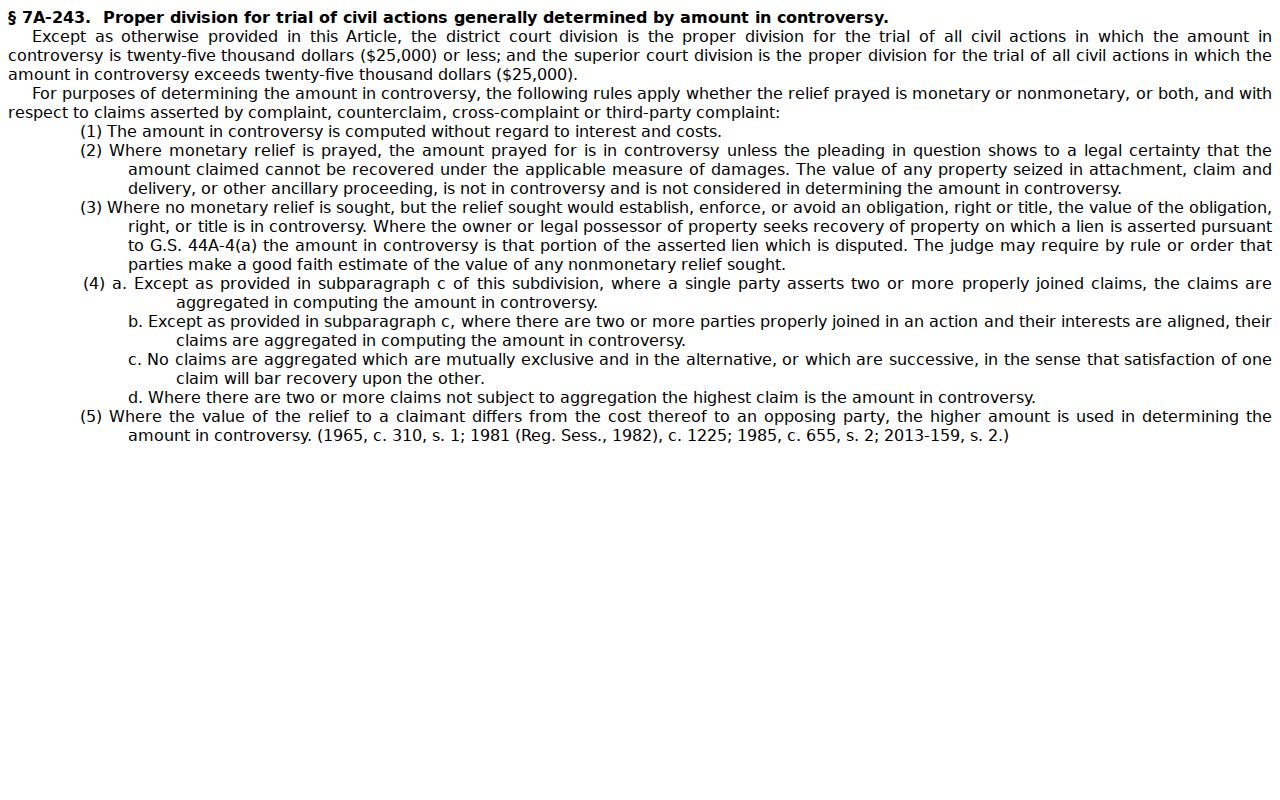
The threshold tells you which Montgomery County civil division a case usually lands in. The unified Clerk structure is why the local record counter stays the same either way.
Inside a Montgomery County Civil Docket
The Portal's documented schema lays out what a Montgomery County civil Case Summary can contain. No record promises the same filed documents or attachments. Sections may include Case Information, Assignment Information, Party Information, Causes of Action, Case Events, Hearings, Dispositions, and Financial Information where applicable. Montgomery County Causes of Action sort a matter as civil, family, probate, or mental-health when the field is filled. They are a label, not a final outcome.
| Record number | The identifier used in Smart Search, with the county portion ending in -610 for Montgomery. |
|---|---|
| Party information | The people, businesses, and roles shown in the public case record. |
| Cause of action | A case classification displayed for civil matters where applicable, not a final judgment. |
| Case events | The chronological Montgomery County public register of filings, notices, orders, or administrative actions. |
| Hearings | Scheduled court proceedings that can be cross-checked in Search Hearings. |
| Dispositions | Recorded outcome or status information, which needs the event history for context. |
Public Montgomery County document images appear only when they are public. They also have to be uploaded. A register may or may not show a petition, answer, service record, or motion. The same goes for an order, judgment, dollar amount, attorney field, or attachment. When that distinction matters, request the official record from the Clerk. The Case Summary is still how you identify which record to ask for.
Montgomery Civil Portal Filters
Portal's Civil Actions filter family sorts the Montgomery County civil record types that share one statewide search system. Enter a principal record number or party name, set Montgomery County as the location, then apply Civil Actions or another advanced criterion. The official static guidance lists these categories. It does not promise public material in every result.
| Portal civil category | How to use it |
|---|---|
| Civil General | Use as a documented civil filter category after setting the Montgomery location. |
| Civil Magistrate | Helps narrow the state-system small-claims path without searching for another local portal. |
| Civil Foreclosure | Portal documentation lists both CV and M civil-foreclosure categories. |
| Confession of Judgment | A documented civil filter label that can refine a supported search. |
| Non-Domestic Restraining Orders | A documented category whose available public information can be limited by law or rule. |
Special Proceedings, when nonconfidential, and Estates are also documented Montgomery County search families. Use search criteria to narrow a matching record, never to replace a number or name. The official guidance advises against selecting Party Name from the advanced area, since it limits results and supports no wildcard use.
Civil Case Types on the Docket
A Montgomery County civil record may sit in Superior Court, District Court, or the magistrate path, depending on case type and jurisdiction. The Portal's published vocabulary offers a safe way to describe broad Montgomery County civil categories without assuming any particular filing or outcome in one case. One Montgomery County Clerk office keeps the local record across those trial-court divisions.
- Civil General matters
- Civil Magistrate matters
- Civil Foreclosure matters
- Confession of Judgment matters
- Special Proceedings that are not confidential
- Estates records available through the documented Portal pathway
The North Carolina District Court overview covers the statewide division that hears most civil actions at or below the statutory threshold, along with the magistrate connection.
District Court and Superior Court are the Montgomery County trial-court divisions. The Clerk and Portal form the common Montgomery County civil record path.
Montgomery Civil Calendar Requests
A civil calendar request is not a docket search. In Montgomery County, it serves one purpose. It lets a litigant or an attorney request a Superior Court setting. It collects file number, caption, requested session, motion type, estimated hearing length, and notice details. It will not show anyone a Montgomery County civil Case Summary.
To check a public date, search the case first. Open Hearings, then use Search Hearings or the Montgomery County civil calendar. Keep in mind a calendar is just a scheduling snapshot. A request, an email, or a missing line cannot change a court date. None of that works on its own. Later activity should appear in the Register of Actions. The Montgomery County Clerk can confirm any setting that looks unclear.
Note: The Montgomery County local schedules page reports no District Court judges schedule at this time. A stable weekly judge schedule should not be assumed.
Civil Docket Settings and Hearings
Once a Montgomery County civil case is located, Portal Search Hearings gives a current hearing search. Its documented search types cover case number, party name, and business name. Attorney name or bar number works too. So do judicial officer and courtroom. You must pick a location and a hearing type to start. The date fields bound the search. Use the most specific information you have. Keep the Montgomery County record number handy in case the Clerk needs to confirm something.
District 28 civil forms use setting labels any Montgomery County litigant will recognize. They include motion, status conference, pre-trial conference, temporary hearing, order to show cause, and trial on merits. Each label names the purpose of a session. No label guarantees that a civil record uses the same wording, or that an older setting is still current. Portal also will not tell you whether a hearing is remote or in person.
A continuance is a postponement the court approves. Check the latest Montgomery County Case Event and Hearing. When a date truly matters, or a newer order is not clear in the public view, call the Clerk.
Montgomery Civil Status Labels
Status words in a Montgomery County civil docket are useful markers, but they belong to the whole Case Summary rather than standing alone. Official Portal materials use labels such as Pending, Reopened, Stayed, Unserved, Appealed, Transfer to Another County, Transferred to Superior Court, Trial De Novo, and several disposed variants. A Montgomery County status can describe the court's posture without revealing every filing, order, or reason behind it.
- Pending
- The civil matter has not reached a final resolution in its listed posture.
- Disposed-Final Judgment No Trial
- A documented civil disposition label that should be understood by reading the case events and any official judgment.
- Stayed
- Further proceedings are paused under an order or rule until later action changes that status.
- Unserved
- A documented Portal status that should not be treated as a final outcome.
Three parts of a Montgomery County civil record do different jobs. A Cause of Action classifies the matter. A status identifies its posture. A disposition, when present, records a case-end or partial case-end action.
Civil Docket Access Rules
You can search public Montgomery County civil case information in Portal without an account. The limits come from law and court rules. The official local records and files for the trial divisions sit with the Montgomery County Clerk of Superior Court. Dockets and indexes are there as well. Portal availability does not promise open access to sensitive matter types or every document image. Protected personal and financial identifiers may be redacted from public documents.
A Montgomery County record may be missing from the online view. Missing online is not missing from the Clerk's files. It may be restricted, historical, transferred, or simply outside the public view. Do not try to defeat an access limit. No broader search, registration, or state-agency public-records request will get around it. For a paper file, permitted inspection, or an official copy, the Montgomery County Clerk is the right local contact.
Public-access rules. G.S. 7A-109 requires the Montgomery County Clerk to maintain court records and generally permits public inspection unless access is prohibited. G.S. 132-6 addresses inspection and copies of public records at reasonable times. G.S. 132-1.10 permits redaction of protected identifying and financial information.
Montgomery Civil Clerk Fallback
For a Montgomery County historic paper file, an unavailable public image, or a certified civil document, contact the Montgomery County Clerk of Superior Court at the Montgomery County Courthouse, 108 E. Main St., Troy. The official courthouse listing shows weekday hours of 8:00 a.m. to 5:00 p.m. The main number is (910) 571-3700. Public self-service terminals at clerk offices can search Montgomery County civil, special-proceeding, and estates information. Paper files come through the clerk office in the county where the case is located.
Certification comes from the Montgomery County Clerk, not NCAOC. Under G.S. 7A-308, copies cost $2.00 for the first page of each document. Each additional page or fraction costs $0.25. A certificate under seal costs $3.00. Ask for the total before sending payment. No Montgomery County civil-copy request form, portal document charge, processing time, or separate docket-sheet fee is published. Official records guidance walks through the Clerk, terminal, paper-file, and certification path that follows a Montgomery County Portal search.